



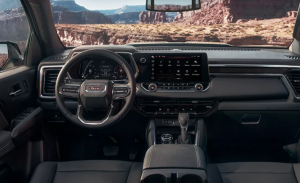
Your GMC is likely equipped with a sophisticated GMC infotainment system. While the specific features of your infotainment system can vary from model to model, some steps for managing your infotainment options are the same for all GMC vehicles. Learn about how to set up your vehicle’s entertainment features before you visit your GMC dealer.
1. Customize Your Home Screen
Your GMC’s infotainment unit allows you to customize the home screen, so your infotainment system displays your preferred apps. Customizing your home screen can make it easier to find your favorite apps and can speed up your infotainment operation so you never have to scroll for the apps you use most often.
Customizing the home screen on your infotainment system is a lot like customizing the home screen on your smartphone. All you need to do is press the Home button, then select the icon you want to move. After holding the icon down for a few seconds, you can drag and drop the icon around the home screen to put the icon in a new position.
2. Download Apps
If your infotainment system is compatible with in-vehicle app services, you can download apps directly onto your infotainment touchscreen unit. These apps include weather, travel, news, and music apps. To get customized apps for your lifestyle, all you need to do is select the Apps icon, scroll to find the app you want, and then download the app.
3. Sync Your Phone
Some GMC models are equipped with Google Built-In features, which allow drivers to access apps like Google Maps for navigation, Google Play for entertainment, and Google Assistant for hands-free phone controls. If your vehicle is compatible with Google Built-In, then all you need to do is sync your phone to your car to use these hands-free Google apps.
You can also sync your phone to your vehicle via a USB cord or aux cord. Depending on your preferences, your infotainment system, and your specific devices, syncing your phone via a USB port can allow you to stream audiobooks, podcasts, or other entertainment applications.
Can You Ask Your GMC Dealer for GMC Infotainment System Help?
If you can’t troubleshoot your infotainment system at home, then you can always ask for help at the dealership. Dealership representatives and mechanics are trained to help you with all of your vehicle’s key features, including setting up the infotainment system. You can also ask about the infotainment features standard for your model during a test drive to get a feel for how these features work before you buy your car.
Infotainment is one of the most essential features of a vehicle for modern drivers. Fortunately, GMC makes it easy to customize your infotainment experience. Learn more about your entertainment and connectivity options when you contact Ed Martin Buick GMC in Carmel, IN.
Connect with us


- August 2026
- July 2026
- June 2026
- May 2026
- April 2026
- March 2026
- February 2026
- January 2026
- December 2025
- November 2025
- October 2025
- September 2025
- August 2025
- June 2025
- May 2025
- April 2025
- March 2025
- February 2025
- January 2025
- December 2024
- November 2024
- October 2024
- September 2024
- August 2024
- July 2024
- June 2024
- May 2024
- April 2024
- March 2024
Archives
- 2025 Model Year
- Acadia
- Brakes
- Buick
- Buick Enclave
- Buick Envision
- Buick Envista
- Buick Information
- Car Battery
- Carmel Buick Dealer
- Carmel Buick Service
- Carmel GMC Dealer
- Crossover
- Ed Martin Buick GMC
- Ed Martin Buick GMC Service
- Encore GX
- Envista
- EV
- GMC
- GMC Canyon
- GMC Information
- GMC Terrain
- Hummer
- Infotainment
- Maintenance
- Offroad
- Oil Change
- Parts
- Pickup
- Safety Features
- Service
- Sierra 1500
- Sierra 2500 HD
- Sierra 3500 HD
- Sierra HD
- SUV
- Tips and Tricks
- Tires
- Towing Capacity
- Truck
- Uncategorized
- Yukon
- Yukon XL